
What should the service include?
AI automation implementation services should include a written workflow scope, verified tool integrations, data and permission rules, realistic testing, human approval boundaries, launch criteria, documentation, and an ongoing support agreement. Before paying for a finished build, ask the provider to demonstrate the agreed business outcome and show what happens when a step fails.
For a small business, the useful deliverable is a process your team can operate: a new inquiry reaches the correct CRM record, gets an assigned owner, and has a clear next action.
What are you buying when you hire an implementation provider?
You are buying the work needed to make a business process run across your actual tools, with real inputs and an accountable owner. That includes decisions about where information comes from, what the workflow may change, who reviews uncertain output, and how staff recover from errors.
A strategy session can identify opportunities. A software subscription can provide the platform. Implementation connects the pieces, tests them against the agreed requirements, and prepares your team to use the result. Ongoing management then keeps those connections and business rules working as systems change.
Use this guide to compare the contents of a proposal. For the broader service model, see what buyers should expect from done-for-you AI automation. For available services, visit Managed AI Automation services.
AI automation implementation deliverables checklist
Ask for these deliverables in writing. The exact tools will vary, but the provider should explain what will be built, what remains your team's responsibility, and how completion will be demonstrated.
| Deliverable | What you should receive | Evidence to request |
|---|---|---|
| Workflow scope | Trigger, inputs, actions, exclusions, owner, and expected outcome. | A process map and written acceptance criteria. |
| Verified integrations | Confirmed CRM, form, email, calendar, and other required connections. | A test using the same account tiers and permissions you will use in production. |
| Data handling | Field mapping, duplicate rules, access boundaries, and retention decisions. | A sample record and an explanation of where the information travels. |
| AI boundaries | Tasks AI may perform, actions requiring approval, and escalation rules. | Examples of uncertain requests reaching a human reviewer. |
| Testing and recovery | Normal cases, exceptions, failed connections, retries, and duplicate prevention. | A test log with results and any unresolved limitations. |
| Launch and handoff | Approval, staff training, operating instructions, and a pause procedure. | A walkthrough performed by the person who will operate the workflow. |
| Ongoing support | Monitoring responsibility, support hours, change process, and costs. | A written support scope with a named point of contact. |
Start with one workflow and one measurable outcome
Choose a process that repeats often enough to inspect and improve. Useful starting points include lead follow-up, CRM record updates, intake routing, and appointment support. Record the current process before setting a target: how many inquiries arrive, how long staff spend handling them, and how often a next step is missed.
Write the desired outcome in plain language. For example: every eligible website inquiry creates or updates one CRM contact, receives an owner, and produces either an approved next action or a visible exception. Define eligibility, timing, and exceptions before the build begins.
Confirm integration access before choosing the platform
A tool may advertise an integration while your subscription tier lacks the required API access. Check account permissions, supported fields, rate limits, authentication, and any additional subscription costs. If there is no suitable connection, the proposal should explain the alternative and its limitations before you approve it.
Prefer fixed rules for predictable steps. Copying a known field or assigning a task may need ordinary automation. AI is more useful when an input needs interpretation, such as summarizing a long inquiry or classifying a service request. Ask how the team will check that interpretation.
Example: accepting a lead-to-CRM implementation
Illustrative workflow, not a client result: a local service company receives quote requests through its website. Staff currently copy the details into a CRM and decide who should respond. The proposed workflow captures the request, summarizes it, updates the contact, assigns a team member, and prepares a reply for review.
- Receive: record the original request and its source, with a unique submission identifier.
- Structure: map contact details and service information into agreed fields; leave missing details visibly incomplete.
- Match: apply an agreed contact-matching rule so a repeat inquiry does not silently create a duplicate.
- Route: assign an owner using service and territory rules; route unclear cases to an exception queue.
- Review: draft the next message for approval. Keep pricing commitments and other restricted decisions behind a human check.
- Observe: record the outcome and alert a named person if the CRM update or notification fails.
The acceptance test is more specific than showing a successful demonstration. Submit a complete inquiry, a repeat inquiry, an incomplete inquiry, and a request outside the service area. Then simulate a failed connection. The expected result for each case should be written down before testing, including who handles the exception.
What should be tested before the workflow goes live?
A reliable test plan checks business outcomes and failure handling. A successful run alone does not show whether staff can recover from an outage or whether a second run creates an unwanted message.
- Normal input: required records and next actions are created accurately.
- Missing or conflicting details: the workflow asks for clarification or routes the item for review instead of inventing an answer.
- Duplicate and repeated events: retries and repeated submissions do not create unintended duplicate actions.
- Connection failure: an unavailable CRM or expired authorization produces a visible failure and an agreed recovery path.
- Human approval: restricted actions stay blocked until an authorized person approves them.
- Unexpected instructions: customer-provided text cannot authorize additional system access or bypass the workflow's permissions.
- Pause and recovery: staff know how to stop the automation and complete the task manually while it is repaired.
Keep the test log, record known limitations, and identify the person authorized to approve launch. Start with a controlled rollout when the workflow affects customer communication or business records. Agree how much real activity will be reviewed before expanding it.
How should costs, milestones, and ownership be documented?
Separate implementation fees from running costs
Request separate line items for discovery, data cleanup, build work, training, and launch. Then identify ongoing platform subscriptions, AI usage, messaging or phone charges, hosting, and support. Ask which costs are paid directly by your business and which are included in the provider's fee.
Pricing depends on the number of integrations, exception paths, data quality, usage, and support requirements. A quote should state its assumptions and explain what triggers a change in scope. See the managed AI automation cost guide for the broader pricing considerations.
Use milestones with reviewable evidence
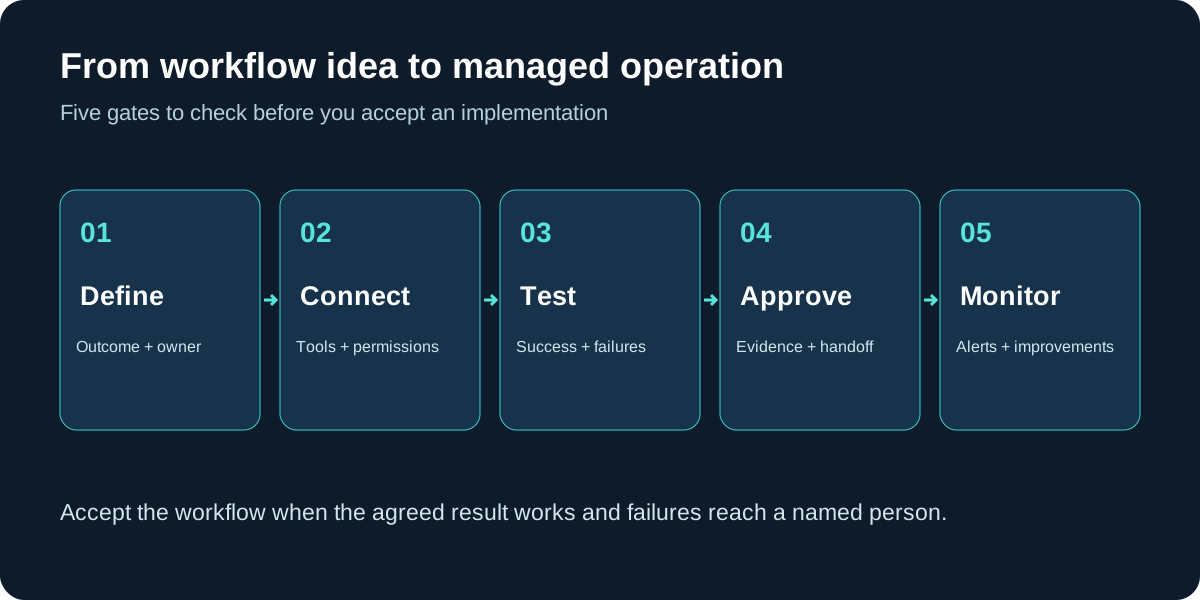
A useful milestone sequence is approved scope, verified connections, testable build, documented acceptance tests, and staff handoff. Ask for dependencies at each stage: access approval, sample data, a staff reviewer, or a decision about business rules. A credible schedule accounts for these dependencies.
Agree who owns the accounts and configurations
Before work begins, document ownership of business accounts, customer data, workflow configurations, and any custom code. Specify what is licensed from the provider, what can be exported, and what support is needed if you move the workflow. Use individual access where supported, limit permissions to the task, and define how provider access will be removed at the end of the engagement.
What should ongoing management include?
Someone should review failed runs, check expired connections, investigate incorrect outputs, and maintain the workflow when your tools or business rules change. Agree support hours, response expectations, what counts as an incident, and which improvements require a separate quote.
Choose a few operating measures your team can understand: eligible inquiries processed, exceptions awaiting review, processing time, duplicate records, and staff time spent correcting output. Compare these with the baseline. Lower manual effort only counts as an improvement if the resulting records and customer actions remain accurate.
Eight questions to ask before approving a proposal
- What exact business outcome will this workflow produce?
- Which account tiers, permissions, and integrations have you verified?
- Where will AI be used, and which steps use fixed rules?
- What happens when information is incomplete or a connection fails?
- Which actions require my team's approval?
- What evidence will demonstrate that the build is ready?
- What will my business own, and how can we pause or move the workflow?
- What are the setup costs, running costs, support responsibilities, and exclusions?
Implementation support for Arizona businesses and remote teams
Managed AI Automation provides managed AI automation for Arizona businesses and remote clients. The useful starting point is your actual workflow: the tools you use, the work staff repeat, and the point where follow-up becomes inconsistent. Share one process you want to improve and the systems it needs to connect.
Remote delivery may suit integration work and staff walkthroughs, while some businesses need additional on-site coordination. Confirm delivery arrangements and support availability during scoping. Explore service areas or request an automation audit to discuss your workflow.
AI automation implementation services FAQs
What are AI automation implementation services?
AI automation implementation services turn a defined business process into a working workflow. The engagement should cover scope, integrations, data handling, testing, human review, deployment, documentation, and an agreed support plan.
Can implementation use our existing CRM and calendar?
Often, yes. Compatibility depends on the tools, subscription plans, API access, permissions, and data quality. Ask the provider to verify each connection before confirming scope or price.
How much does AI automation implementation cost?
Request a scoped quote that separates discovery and setup from software subscriptions, usage fees, monitoring, and ongoing changes. Cost depends on workflow complexity, integrations, volume, data cleanup, and support requirements.
How long does AI automation implementation take?
A credible schedule depends on confirmed access, workflow scope, data cleanup, testing, and approval availability. Ask for milestones and dependencies rather than accepting a fixed launch promise before discovery.
Who should own the accounts and workflow after launch?
Your agreement should specify ownership of business accounts, data, workflow configurations, documentation, and any custom code. It should also explain licensing, provider access, export options, and the handover process if you change providers.
Does every workflow need an AI agent?
No. Fixed rules are often better for predictable steps such as creating a task or copying a field. AI can help with unstructured text, summaries, or classification when its output can be checked.
Can an Arizona business work with an implementation provider remotely?
Many implementation tasks can be handled remotely when the provider can securely access the required systems. Confirm onboarding, staff training, support hours, and any work that requires an on-site visit.
Related guides
Bring one workflow. Start with a clear scope.
Tell us which task gets repeated, which tools your team uses, and where follow-up breaks down. Request an audit to discuss the scope, integrations, and support your workflow needs.
Request an AI Automation AuditPrefer to call? 623-255-4088