
Who can fix a broken AI automation?
Look for an automation specialist who can inspect your existing workflow, trace the failed step, verify the connected accounts, and test the repair against the business outcome. AI automation repair services should include diagnosis, a scoped repair or rebuild recommendation, recovery checks, documentation, and a named support owner.
A provider may be able to take over a workflow someone else built when you have the necessary access and rights. Before commissioning changes, confirm ownership, platform compatibility, and whether the original configuration can be inspected or exported.
When does a workflow need repair?
A form still receives inquiries, but nothing reaches the CRM. An appointment workflow creates duplicate reminders. An AI agent drafts a response but never assigns the follow-up task. These are business failures even when a dashboard reports that some steps completed successfully.
Start by describing the result that stopped happening, when it last worked, and which records are affected. A repair assessment should separate the immediate interruption from the underlying cause. Reconnecting an account might restore one run; checking why the connection failed and who receives the next alert helps your team operate the workflow afterward.
This guide focuses on existing systems that need diagnosis or a provider handover. If you are commissioning a new build, use the AI automation implementation services checklist to define deliverables before work begins.
Common symptoms of broken AI automation
The same symptom can have several causes. Treat these as investigation starting points rather than a diagnosis of your system.
| What your team sees | What to investigate | What the repair should demonstrate |
|---|---|---|
| New inquiries never reach the CRM | Trigger activity, webhook delivery, account access, filters, and required field mapping. | A new eligible inquiry reaches the intended record with an owner and next action. |
| Customers receive duplicate messages | Repeated events, overlapping workflows, retries, and contact-matching rules. | A repeated event does not cause an unintended second customer action. |
| The workflow suddenly stops | Connection authorization, platform limits, billing status, scheduling, and recent changes. | The original failure is explained and a new test completes through the full process. |
| AI output reaches the wrong destination | Input quality, classification rules, output validation, and human review boundaries. | Known examples route correctly; uncertain cases reach a reviewer. |
| A run says success, but staff see no result | Each downstream action, target account, record identifier, and business outcome. | The record or task exists in the destination your team actually uses. |
| Nobody knows how the system works | Account ownership, workflow exports, credentials inventory, dependencies, and prior documentation. | An operating map, a pause procedure, and a named owner are handed over. |
Check the execution history before changing the workflow
For Zapier, review the run history and the affected step; its official troubleshooting guide explains how errors can point to connection and application problems. For n8n, failed executions and error workflows provide evidence for diagnosis and alerting. In Make, incomplete executions can preserve unfinished runs when that feature is enabled. Availability and retention depend on your setup and plan.
Use the platform's current instructions: Zapier error troubleshooting, n8n error handling, and Make incomplete executions. These tools provide evidence; the repair still needs to prove the intended business result.
Preserve the evidence before replaying failed work
Keep the affected run identifiers, approximate failure time, last successful result, and a redacted example. Record recent changes to CRM fields, permissions, forms, subscriptions, and workflow versions. Avoid changing several settings at once before the failure is understood.
Before replaying a backlog, identify which actions already happened. A partially completed workflow may have sent a message or created a record before a later step failed. Agree how existing actions will be recognized so recovery does not create duplicate customer contact or records.
Can a new provider take over automation someone else built?
Often, yes, but access and ownership determine what is possible. A workflow held entirely in an agency account may be harder to inspect or transfer than one built inside your business's own account. Custom code, licensed components, undocumented dependencies, and unavailable exports can change the scope.
Ask the incoming provider to inspect the setup before promising a complete takeover. The handover should establish:
- Account control: who owns the automation platform, CRM, email, calendar, phone, hosting, and AI service accounts.
- Configuration access: whether workflows, prompts, rules, field mappings, and custom code are accessible and transferable.
- Dependencies: which external services, subscriptions, webhooks, and scheduled tasks the process relies on.
- Operational knowledge: what each workflow is supposed to do, which exceptions are expected, and who currently handles them.
- Transition responsibilities: who approves changes, who maintains service during the handover, and when former provider access is removed.
Use individual, limited access where the tools support it. Do not put passwords, API keys, or unredacted customer records in an initial inquiry. Arrange the access method during scoping, and keep account recovery under your business's control.
Should you repair the workflow or rebuild it?
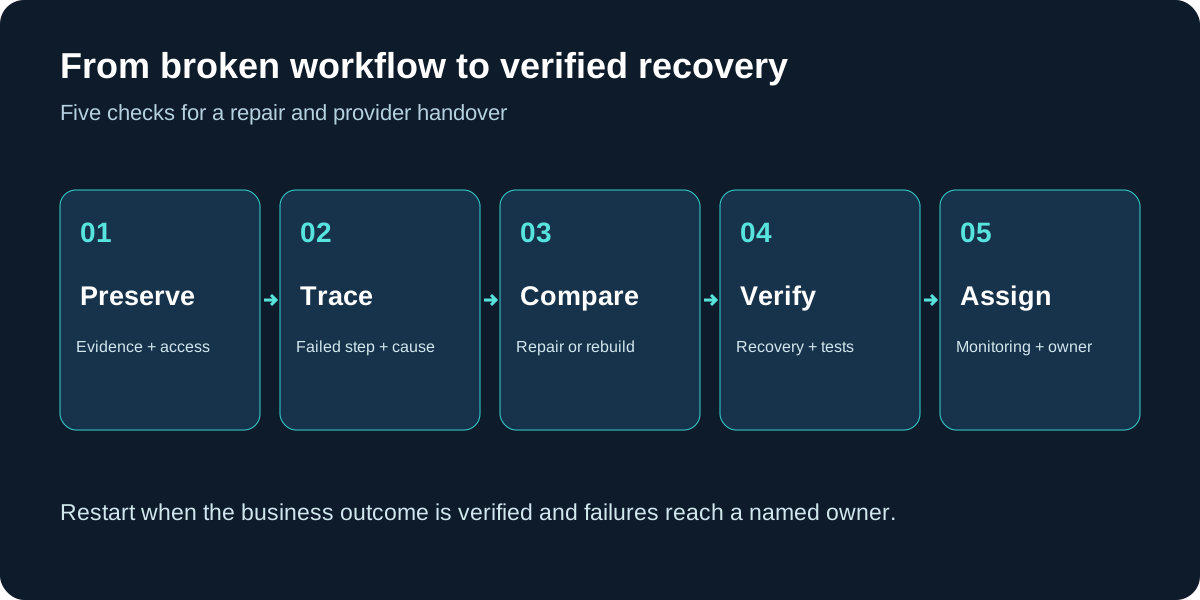
Repair is a reasonable starting point when the business process still fits, account access is available, and the failure is limited enough to isolate. Rebuilding may be more appropriate when the design no longer matches the business, key components cannot be accessed, or layers of undocumented work make changes difficult to test.
Ask for both the reasoning and the scope. A recommendation to rebuild should explain which part of the existing design prevents a dependable repair. A recommendation to patch should explain any remaining limitations and the conditions that could cause the failure to return.
- Consider repair: a field changed, a connection needs reauthorization, a filter is incorrect, or one route lacks error handling.
- Consider a partial rebuild: one unreliable component can be replaced while the surrounding process remains understandable and testable.
- Consider a full rebuild: the underlying process is obsolete, ownership cannot be resolved, or the provider cannot establish a trustworthy operating baseline.
Replacing platforms is a separate decision. Ask what migration would solve, what it would cost, and how existing records and pending work would be handled. Familiar tools with clear rules may be a better fit than a new platform that reproduces the same process gaps.
What should AI automation repair services include?
Request a written diagnosis, an agreed scope, a record of changes, and evidence that the repair works. Separate incident recovery from new features. Otherwise a specific interruption can turn into an open-ended implementation project.
- Identify the failure: show the affected step, the business impact, and the evidence behind the diagnosis.
- Agree on the change: document the repair, its exclusions, dependencies, price, and approval requirements.
- Protect the current state: save available configuration exports or versions and define a pause or rollback procedure before changing production.
- Test representative cases: run a normal case, an incomplete case, a duplicate event, and a relevant failure case.
- Recover pending work: reconcile the backlog with actions already completed before replaying anything.
- Hand over operation: explain what changed, how to recognize another failure, and who owns monitoring and support.
Example: repairing a failed lead-to-CRM workflow
Illustrative example, not a client result: a service company changes a required CRM field. Website inquiries continue arriving, but the automation cannot create new contacts. A repair specialist checks recent failures, verifies the field requirement, and updates the mapping or exception path.
The acceptance check should use a new inquiry, an existing contact, and an inquiry missing the required information. Verify the contact, assigned owner, and next action inside the CRM. Then reconcile older failures against records already created before processing the backlog. The handoff should explain the field dependency and how staff will learn about another rejected record.
That is a more useful completion standard than simply clearing an error message. Read the related CRM automation guide and lead follow-up automation guide when defining the intended outcome.
How much does automation repair cost, and how long does it take?
A credible estimate follows access checks and an initial diagnosis. Cost depends on the number of affected systems, available logs, configuration quality, custom code, backlog recovery, and testing requirements. A provider should distinguish diagnosis fees, repair work, third-party charges, ongoing support, and optional improvements.
Ask for a scoped quote with milestones and assumptions. If diagnosis reveals a wider problem, agree on the next step before expanding the work. Timing also depends on account access, approval availability, vendor outages, and how much recovery is needed. Avoid choosing solely on a promised turnaround before the provider has inspected the system.
For the ongoing service model, see managed AI automation cost considerations. A monitoring arrangement should specify coverage hours, notification routes, response expectations, and which changes require a separate quote.
What should you bring to a repair assessment?
Prepare a short description your operations team can verify. You do not need to diagnose the technical cause yourself.
- The outcome that should happen and what happens instead.
- The platform and connected business tools, including who owns the accounts.
- When the issue began and the last known successful outcome.
- A redacted error message, run identifier, or example record.
- Recent changes and an estimate of pending work.
- Any available workflow map, export, or handover notes.
- The person authorized to approve access, changes, and restart.
Download the automation repair assessment checklist to gather these details before a call.
Discuss an existing workflow with Managed AI Automation
Managed AI Automation serves Arizona businesses and remote clients. If your automation is failing or you need to discuss a provider handover, start with the affected process and the tools it connects. Request an assessment so access, platform fit, repair options, and support needs can be reviewed before work is scoped.
Explore managed AI automation services or service areas. For the initial inquiry, describe the problem without sending secrets or customer data. Compatibility, delivery arrangements, pricing, and availability need to be confirmed for your system.
AI automation repair services FAQs
Can you fix an automation another agency built?
A provider may be able to assess and repair it if your business has the necessary access and rights. First confirm account ownership, workflow visibility, platform compatibility, and any licensed or inaccessible components.
Can a workflow fail even when the dashboard says success?
Yes. A run may finish without producing the business result your team expects. Check the destination record, assigned owner, customer action, and downstream steps rather than relying only on the run status.
Should failed automation runs be replayed immediately?
First identify which actions already completed. Check for messages sent, records created, and overlapping recovery processes so replay does not cause unintended duplicate actions.
Should I repair my existing automation or rebuild it?
Repair may suit a limited failure in a workflow that still fits the business. A partial or full rebuild may be appropriate when the process is obsolete, key components are inaccessible, or the existing design cannot be reliably tested.
How much do AI automation repair services cost?
Costs depend on diagnosis, account access, the number of connected systems, custom code, recovery work, and testing. Request separate scope and pricing for diagnosis, repair, third-party costs, and ongoing support.
Can someone take over my Zapier, Make, or n8n workflow?
Takeover depends on account access, configuration visibility, ownership rights, hosting dependencies, and the incoming provider's platform experience. Confirm these before agreeing to a handover.
What should I send before a repair assessment?
Describe the intended outcome, what failed, the connected tools, the approximate start time, and any recent changes. A redacted error or run identifier can help. Do not send passwords, API keys, or unredacted customer records in the initial inquiry.
Related guides
Need help with a broken workflow?
Tell us what stopped working, which tools are connected, and who owns the accounts. Request an assessment to discuss repair options and a clear handover.
Request an Automation Repair AssessmentPrefer to call? 623-255-4088