
Is AI automation worth the cost?
Managed AI automation is worth considering when the usable value of a specific workflow exceeds its setup cost, subscriptions, usage, management, and human review. Measure one process before buying, estimate the benefit conservatively, and compare both cash-only results and the value of staff capacity you can actually redeploy.
AI automation ROI for small business should answer a buying question: will this workflow create enough measurable value to justify its full cost? A lower workload or an unreliable process can make a smaller project—or no automation—the better decision.
What does AI automation ROI actually measure?
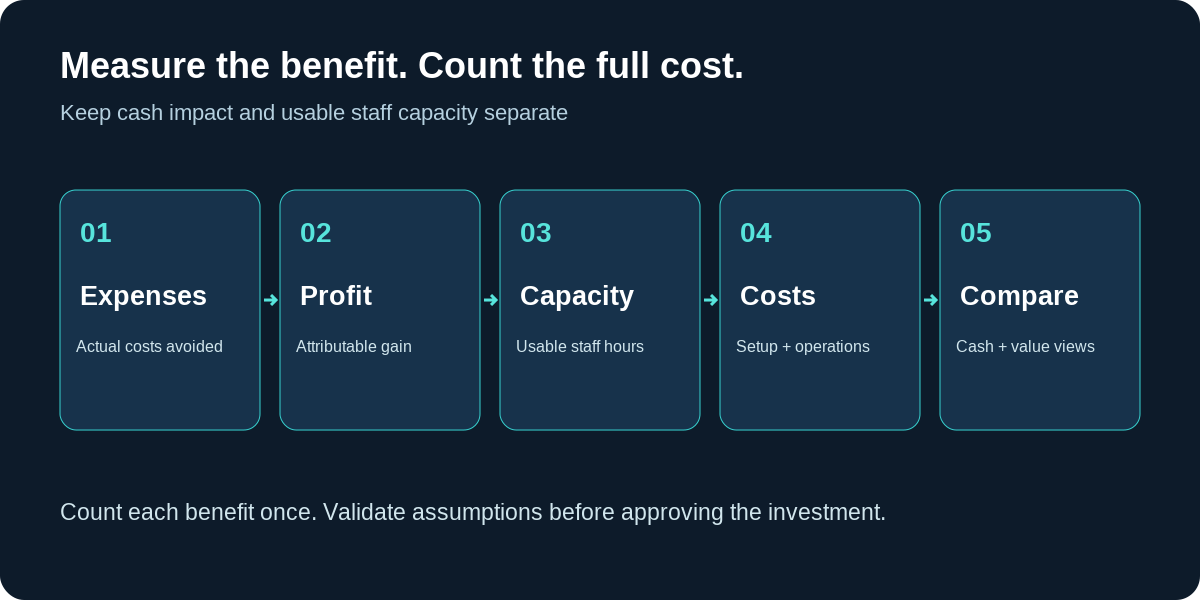
Return on investment compares the benefit of an automation with its cost over a defined period. For a small business, benefits can include actual expenses avoided, additional gross profit attributable to the workflow, and usable staff capacity. Those are different categories. Twenty hours freed up does not automatically mean twenty hours disappear from payroll.
Keep a cash-only view alongside a capacity-inclusive view. If employees remain on the same schedule, freed time is capacity until you can show how the business uses it. If the same hours generate additional gross profit already counted elsewhere in your estimate, do not also count their full labor value. That would count the same benefit twice.
This guide complements the managed AI automation pricing guide. It focuses on whether a proposed investment makes sense, rather than repeating a provider's price list.
AI automation ROI calculator for small business
Replace the illustrative defaults with your own monthly figures. All amounts are USD. No form submission or sign-in is required; calculation runs in your browser.
Select Calculate ROI to see your estimate.
Planning estimate, not a quote or guaranteed return. Ongoing costs should include any extra paid review labor. The review hours above reduce freed capacity; do not charge those same salaried hours again unless they create an additional expense. Exclude overlapping benefits.
What costs should you include before buying?
Ask for a scoped quote with one-time and recurring costs separated. Include your team's onboarding time and costs paid directly to third-party tools. A low setup fee can still be poor value if usage charges or maintenance exceed the benefit.
| Cost category | What to include | Question for the provider |
|---|---|---|
| Setup | Discovery, workflow design, integrations, data cleanup, testing, and staff onboarding. | What is included, and what would change the scope? |
| Subscriptions | Automation platform, CRM upgrades, hosting, and connected tools needed for this workflow. | Which account tiers and licenses are required? |
| Usage | AI processing, messages, calls, task runs, and storage. | What happens at normal and peak volume? |
| Management | Monitoring, incident handling, maintenance, and agreed improvements. | What support is covered, during which hours? |
| Review and exceptions | Approvals, quality checks, corrections, and manual handling of unusual inputs. | How much staff involvement remains? |
Use the implementation deliverables checklist to compare proposals on the work and evidence supplied, not only the headline price.
Worked example: positive capacity value, negative cash-only return
Illustrative assumptions only—not a client result, market price, or savings promise: a service business handles 400 requests monthly at six minutes each. Automation removes 75% of the task time but needs five hours of monthly review and correction.
- Manual baseline: 400 × 6 ÷ 60 = 40 hours a month.
- Net freed capacity: (40 × 75%) − 5 = 25 hours.
- Usable capacity value: 25 × $30 × 60% = $450 a month.
- Separate actual expenses avoided: $150. Additional attributable gross profit: $300.
- Total capacity-inclusive benefit: $450 + $150 + $300 = $900 a month.
- Recurring cost: $500 a month. Setup: $2,000.
The capacity-inclusive net benefit is $400 monthly, giving a simple five-month setup payback once full operation starts. Across 12 full operating months, benefit is $10,800 and total cost is $8,000, so modeled ROI is 35%.
The cash-only result is different: $150 + $300 − $500 = −$50 per month. Cash-only first-year ROI is −32.5%, and setup is not recovered under these assumptions. A business that needs an immediate cash reduction should not treat the capacity-inclusive estimate as cash in the bank.
If the extra $300 gross profit comes from the same hours valued at $450, remove the overlapping capacity benefit. Change the calculator to a conservative case: zero usable capacity and zero extra gross profit. The workflow then loses $350 monthly before setup. This is why assumptions matter more than an attractive percentage.
How to calculate ROI and break-even
Use a consistent period and distinguish estimated value from measured results. The calculator uses these formulas:
- Net freed hours = maximum of zero and (monthly tasks × manual minutes ÷ 60 × time removed percentage − review hours).
- Usable capacity value = net freed hours × loaded hourly cost × usable capacity percentage.
- Cash-only monthly benefit = actual expenses avoided + additional attributable gross profit.
- Capacity-inclusive benefit = cash-only benefit + usable capacity value, with overlapping benefits excluded.
- Monthly net benefit = monthly benefit − recurring monthly cost.
- Simple setup payback = setup cost ÷ positive monthly net benefit.
- First-year ROI = (12 × monthly benefit − total first-year cost) ÷ total first-year cost × 100.
- Total first-year cost = setup cost + 12 × recurring monthly cost.
If monthly net benefit is zero or negative, there is no setup payback under that scenario. If total cost is zero, ROI as a percentage is undefined. The calculator assumes stable results for 12 full operating months and excludes taxes, financing, discounting, ramp-up, and opportunity costs. If launch takes two months, model the actual timeline separately; do not credit benefits before the workflow operates.
How much monthly benefit would justify the setup?
Choose a payback period that suits your business. To recover a $2,000 setup over 12 operating months while covering $500 monthly costs, the workflow needs at least $666.67 in monthly benefit: $500 + ($2,000 ÷ 12). Decide whether that threshold must be met in cash or whether demonstrated capacity value also counts.
How do you measure benefits without inflating them?
Record a representative baseline: request volume, handling minutes, completed outcomes, error rates, and exception time. After a controlled pilot, measure the same items and include staff review. Use a range when work varies by season or request type.
For lead follow-up automation, measure qualified opportunities and attributable gross profit rather than assuming every faster reply becomes a sale. Gross profit is revenue less direct delivery costs. For CRM automation, measure usable records, duplication, staff correction time, and whether tasks reach an owner.
Keep three scenarios: conservative, expected, and upside. Make the conservative case use lower volume, more review, and no unproven sales lift. Ask what must be true for the expected case to work, and who will verify those assumptions.
When is AI automation not worth it yet?
- The task occurs too rarely to cover setup and maintenance.
- The process changes so often that rules and integrations cannot stay current.
- Staff corrections consume most of the time supposedly saved.
- Freed hours cannot be redeployed and no actual expense is avoided.
- The estimate counts revenue as profit or counts one benefit twice.
- A simpler form, fixed-rule automation, or clearer operating procedure solves the problem at lower cost.
Start with a narrower workflow or improve the manual process first when those conditions apply. If an existing automation is failing, review repair versus rebuilding before funding a replacement.
What should an ROI-focused automation audit deliver?
Ask for a prioritized workflow, a measured baseline, verified integration requirements, a full cost estimate, and a test plan. The audit should identify assumptions, remaining human work, and what could make the project uneconomic. Agree how success will be measured before approving the build.
Download the ROI planning worksheet and record your assumptions beside the calculator output. Bring the workflow, current tools, monthly volume, and cost estimates to a discussion with Managed AI Automation. The business serves Arizona businesses and remote clients; review service areas or request an audit to discuss scope.
AI automation ROI for small business FAQs
Is AI automation worth it for a small business?
It can be worthwhile when a specific workflow produces enough measurable benefit to cover setup, recurring costs, and remaining human work. Compare a conservative cash-only case with a capacity-inclusive case before buying.
How do I calculate AI automation ROI?
For a defined period, subtract total automation costs from the benefits, divide by total costs, and multiply by 100. Keep actual expenses avoided, attributable gross profit, and usable staff capacity separate so benefits are not counted twice.
Does saving staff time reduce payroll costs?
Not automatically. If staff remain on the same schedule, time saved is capacity rather than an immediate cash reduction. Count usable capacity separately and document what productive work will replace the removed task.
How long does automation take to pay for itself?
Simple setup payback equals setup cost divided by positive monthly net benefit. If monthly benefit does not exceed recurring cost, there is no setup payback under that scenario. Allow separately for onboarding and ramp-up.
What costs belong in an automation ROI estimate?
Include setup, onboarding, required subscriptions, usage, monitoring, maintenance, and extra paid review or correction work. Include staff review time when estimating net freed capacity.
Can this calculator guarantee my savings?
No. It models the assumptions you enter over 12 full operating months. Actual outcomes depend on workload, adoption, quality, integration reliability, review effort, and whether benefits are realized without double counting.
Related guides
Estimate your workflow’s potential return.
Bring your current workload, tools, and cost assumptions. Request an audit to discuss a measurable workflow and the conditions that would make it worthwhile.
Request an Automation Audit to Estimate Your Potential ReturnPrefer to call? 623-255-4088